

We want our children to move from being merely consumers of information to creators of content. In a technologically-driven world, we must give our children the knowledge and skills to succeed in life.
Technology not only supports learning, but can transform and enhance it, giving children wider experiences and more contextual understanding.
Apps, add ons, extensions can work seamlessly alongside Google services such as Classroom and Slides to help facilitate learning, allowing children to utilise the all-important ‘four Cs’ – communication, collaboration, critical thinking and creativity.
Our computing intent is to ensure all pupils leave school with the skills and knowledge to navigate a world where technology is increasingly commonplace.
We invest in Chromebooks, computer science resources and interactive whiteboards across the trust to enhance each child’s capabilities and encourage them to take ownership of their learning.
Computing is also used largely as a tool for cross-curricular learning within day-to-day lessons, to maximise the opportunity for communication, collaboration, critical thinking and creativity. Elements of computing such as coding and debugging are also taught discretely, interlinked with wider curriculum learning.
The skills and concepts sit broadly under the headings of Computer Science (CS), Information Technology (IT) and Digital Literacy (DS).
Computer Science: Logical Reasoning and Solving Problems Through Coding
Information Technology: Search, Collect, Design and Evaluate Information
Digital Literacy: Use Technology Responsibly and safely, Recognise acceptable and unacceptable Behaviour, Identify how to Raise Concerns, Understand Collaborative Opportunities
Although computing has been removed from the EYFS Framework, at Haxby Road Primary Academy we ensure we introduce aspects of the 3 strands of the computing curriculum throughout our Early Years provision. For example, elements of pre-coding, safety offline (and how that can support safety online) and how we can use technology to help us.
For our E-Safety policy, see our policies page.
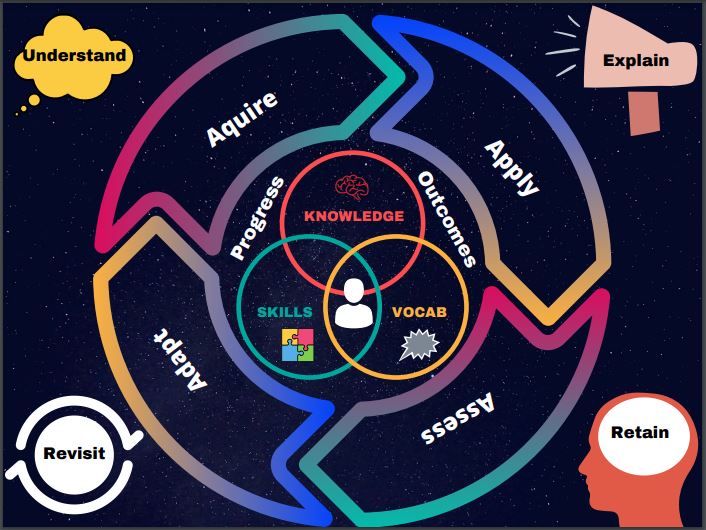
Our computing curriculum, based on Ebor’s progression of knowledge and skills (which is in turn informed by the National Curriculum), is mapped through cross curricular, connected learning opportunities interwoven within all areas of learning. This means computing can be taught alongside other areas of the curriculum, allowing for a creative, holistic and contextual approach. Having the computing objectives mapped out across the year, for every year group based on the progression of knowledge and skills, allows us to ensure all children have solid platforms to build upon as they move through school. This allows us to diminish any gaps in understanding and ensure children can know more and remember more. Knowledge retention is further supported by the integration of quiz based platforms into curriculum reviews.
Computing is delivered through a meaningful sequence of lessons, building on small steps progression, leading to a final cross curricular outcome. These outcomes and assessment strategies require children to apply and demonstrate a deep understanding of their knowledge and skills within different contexts. For example, Children in Year 3/4 were exploring healthy eating and nutrion in science and therefore created a step counter using micro:bits in computing. In order to successfully create their step counters, children had to apply their previously aquired knowledge of algorithms (including selection and repetition, debugging and sequencing).
Please see below for the computing progression of knowledge and skills.
Computing Progression of Knowledge – NEW (1)
Accessibility for SEND Children – Google Chrome Resources (4) (1)
SEND Accessibility Resources KS1
SEND Accessibility Resources KS2
For any advice or guidance on how to stay safe online, follow the links below.
Safebook- Social Media Advice Poster
HRPA NS26 – Remote Teaching and Learning Policy (V1 – Sept 2020) (1)
The document above highlights our Remote Teaching and Learning Policy and includes our specific contextual school offer and what we will provide for our children with regards to remote teaching and learning.
Seesaw and Google classroom will largley facilitate remote teaching and learning across school to ensure all children have access to immediate high quality education in the event of bubble or individual isolation.
A mixture of asynchronous and synchronous activities will be provided. Asynchronous activities refer to tasks which the children complete on their own and at their own pace (E.G. Hyperdocs and Google slides). Pre-recorded teacher inputs and support will also be provided within the slides through apps such as Vidyard or Loom, which therefore ensures all pupils (even at home) have access to teacher modelling. These activities will encourage children to become more autonomous, whilst also offering teacher support. Learning opportunities provided will mirror ongoing curriculum design (based on the national curriculum). Apps, add-ons and extensions such as quiz based platforms will allow children to develop retention skills in order for them to know more and remember more. Synchronous learning refers to live lessons or check ins which will take place through Google Meet. For example, enrichment and interventions lead by staff at home.
As teachers already use Google slides to deliver lessons, our procedures in place mean the children at home have access (where available) to the exact same learning as the children in school, also supported by teacher videos and SEND provisions. Immediate feedback will also be provided verbally or written within the platforms to ensure children have continual contact with teachers but also have a clear picture of how to progress their learning.
All remote teaching and learning is monitored daily to ensure children and familes have access to ther learning and are completing their work as well as receiving meangingful feedback.
Example Resources and Provisions
SEND Year Group Essentials KS1
SEND Year Group Essentials KS2
Google Slides Example – Normal Planning (home learning prompts)
Hyperdoc Example Amazon Rainforest
Apps for Chromebooks – specific for independent learning